
Standard business card size: mm, cm, inch, px and bleed chart
What is the standard business card size? 90×54 and 90×55 mm, a conversion chart in mm, cm, inch and px, bleed and safe zone, horizontal or vertical cards by industry, plus a pre-print checklist.
Every site gives a different number: 90×54, 90×55, 90×50 mm… so you are not sure which business card size is right, or how many pixels to set in Photoshop so the print is not blurry. This post brings together the conversion chart, bleed, and how to set up the size in three popular tools.
What is the standard business card size?
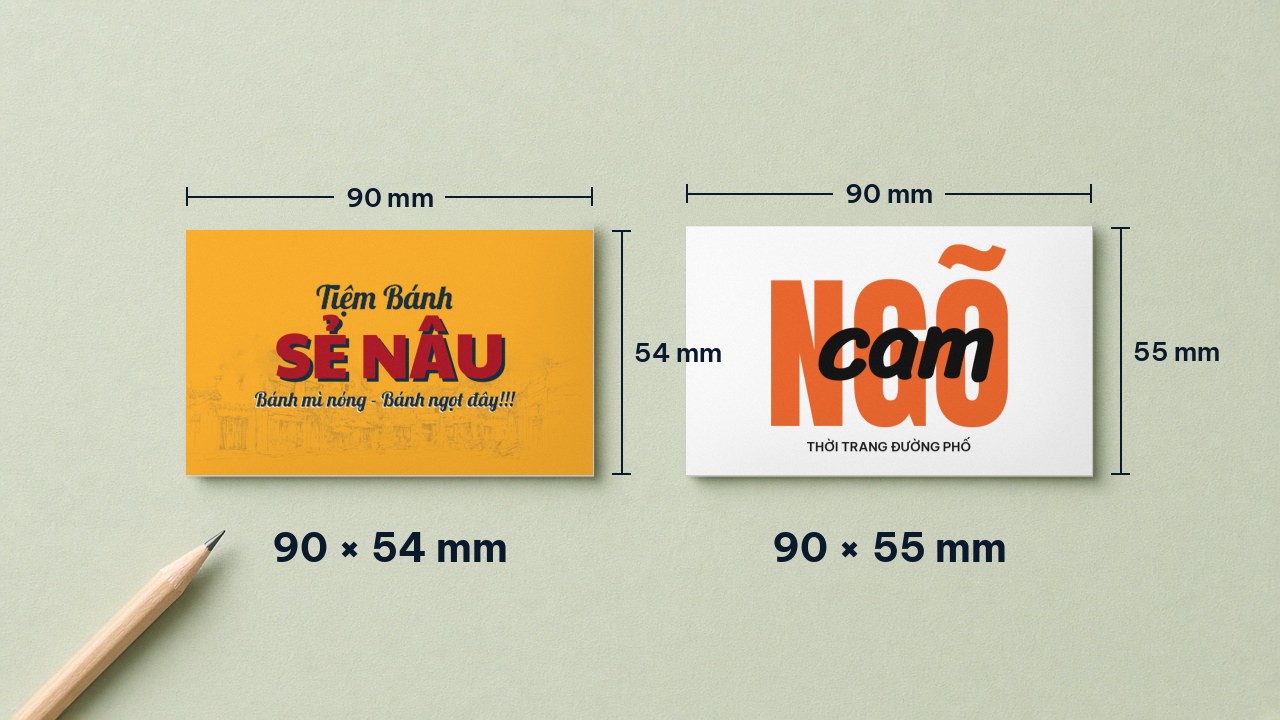
There is no single worldwide standard for business cards. In Vietnam, the two most common sizes are 90×54 mm (9×5.4 cm) and 90×55 mm (9×5.5 cm). When building the file, set the resolution to 300 ppi (pixels per inch) and add bleed as your printer requires; 90×54 mm is about 1063×638 px.
International summaries of business card sizes list Vietnam under 90×55 mm.
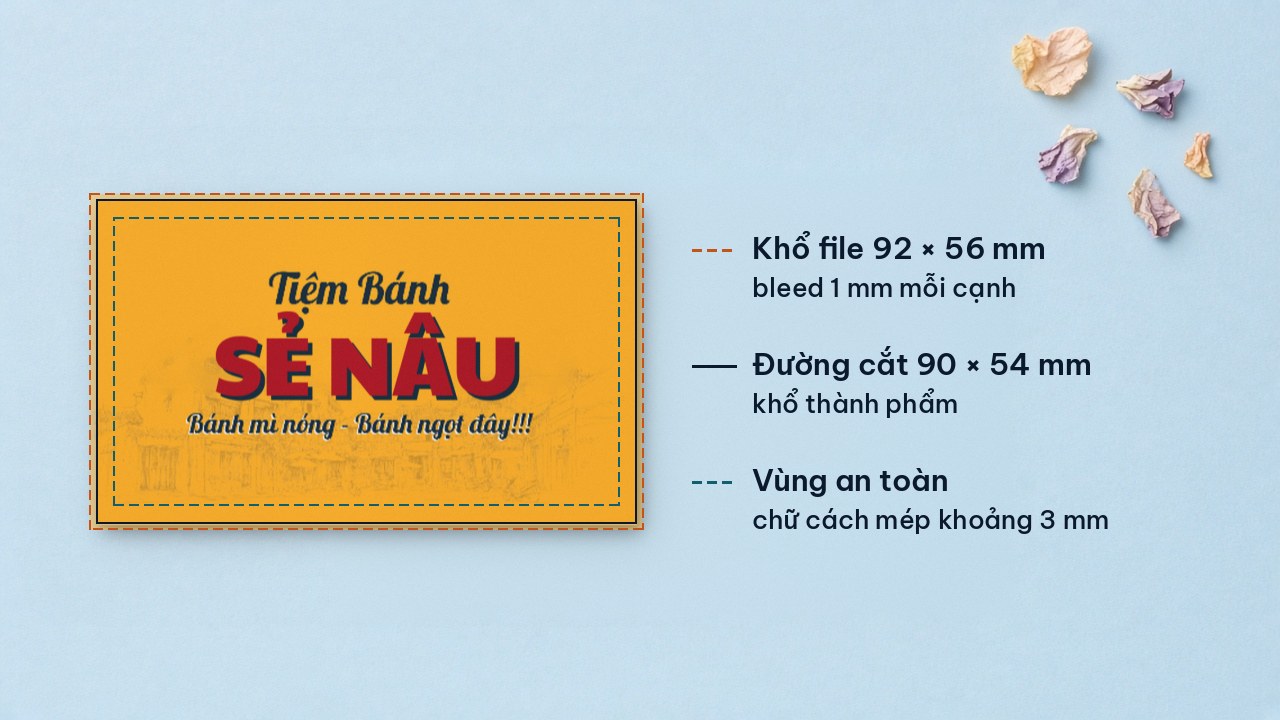
Many local print shops list a finished size of 90×54 mm with a 92×56 mm design file (1 mm added on each side); some list 90×50 mm.
Business card templates on Printaz are pre-set at 90×55 mm.
A 1 mm difference hardly matters in the hand, but it does matter when the print shop imposes and trims the cards. So choose the exact size used by the shop you plan to print with.
Business card size chart: mm, cm, inch, px
Formula: px = mm ÷ 25.4 × 300 (converted at 300 ppi, rounded). Each line gives the finished size, then cm, inch and px:
90 × 54 mm: 9 × 5.4 cm · 3.54 × 2.13 in · 1063 × 638 px. Common at Vietnamese print shops.
90 × 55 mm: 9 × 5.5 cm · 3.54 × 2.17 in · 1063 × 650 px. The size listed for Vietnam in international summaries; Printaz template size.
90 × 50 mm: 9 × 5 cm · 3.54 × 1.97 in · 1063 × 591 px. Used by some print shops.
55 × 90 mm (vertical): 5.5 × 9 cm · 2.17 × 3.54 in · 650 × 1063 px. Vertical card.
85.6 × 53.98 mm: 8.56 × 5.4 cm · 3.37 × 2.13 in · 1011 × 638 px. ID-1 card size under ISO/IEC 7810, same as a bank card.
88.9 × 50.8 mm: 8.89 × 5.08 cm · 3.5 × 2 in · 1050 × 600 px. Common size in the US and Canada.
92 × 56 mm: 9.2 × 5.6 cm · 3.62 × 2.20 in · 1087 × 661 px. A 90×54 file with 1 mm bleed on each side.
The 72 ppi trap: at 72 ppi, 90×54 mm is only about 255×153 px. Some articles call this the "standard pixel size", but a file like that will print blurry.
Bleed and safe zone when designing a business card
Bleed is background that extends beyond the trim line so the card does not show a white edge. File size = finished size + bleed on both sides.
Bleed depends on the print shop: many local business card printers use 1 mm per side; our print-file checklist uses 3 mm as a reference. Ask your printer before building the file.
Safe zone: keep text, logo and phone number about 3 mm inside the trim line.
Backgrounds and images extend all the way into the bleed; text does not.
Read more: What is bleed (in Vietnamese).
Setting the business card size in Photoshop, Illustrator and Canva
Photoshop
Create a new document, choose millimeters and enter the size including bleed (for example 92×56 mm), resolution 300. If you work in pixels, enter 1087×661 px. Set the color mode your printer asks for; see RGB vs CMYK.
Illustrator
Create a document with an artboard at the finished size of 90×54 mm, then enter the bleed in the bleed fields of the new document dialog. This keeps the trim line and bleed area clearly visible when you export a PDF.
Canva
Choose a custom size in millimeters. When downloading for print, prefer the print PDF format, turn on bleed if available, then check the color mode and trim line before sending it to the printer. See: Can Canva files be printed? (in Vietnamese).
Horizontal, vertical or square: choose by industry
Horizontal 90×54/90×55: suits spas, nail salons, fashion stores and services. Fits easily in a wallet; name and phone number are quick to read.
Vertical 55×90: suits cafés, flower shops and bakeries. Works well with upright logos and product photos.
Square: suits brands that want to stand out. There is no common size, so ask your printer first.
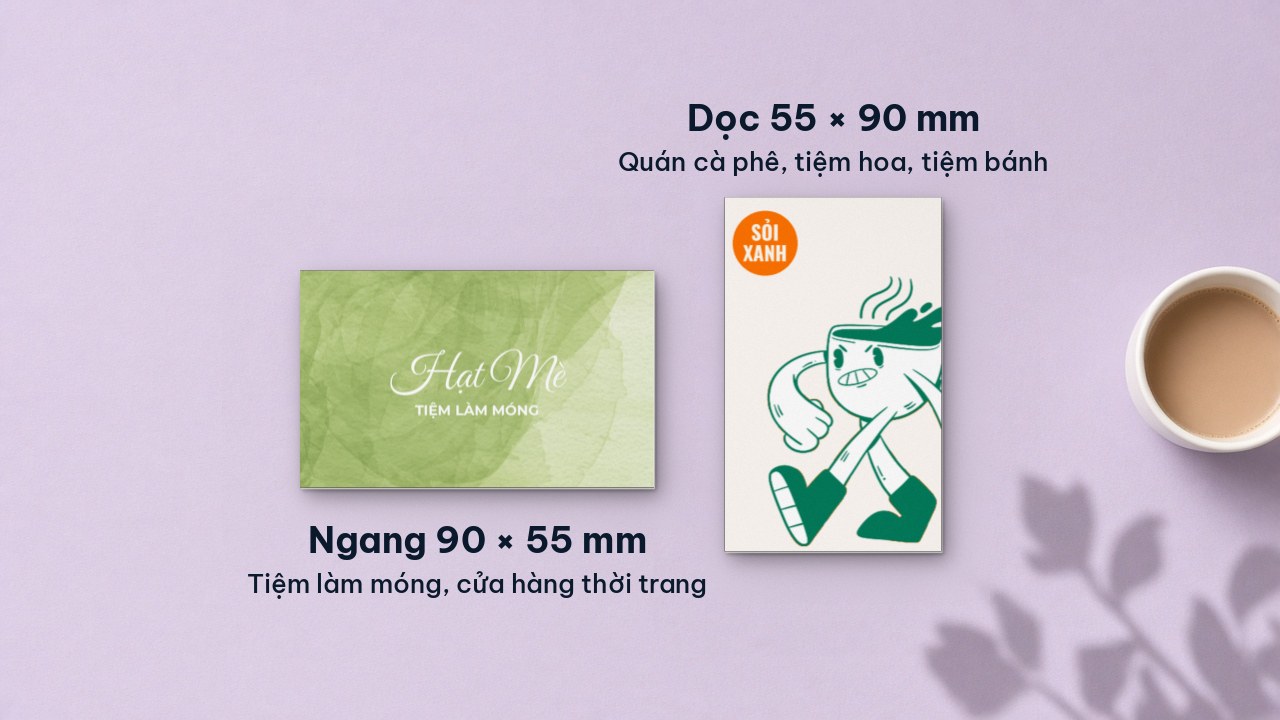
The business card template library has templates by industry, such as fashion and accessories, cosmetics and gifts (nail salon card), food and drink (bakery card), a vertical 55×90 mm café card, and the new elegant flower shop business card.
The business card size is also often used for loyalty cards or small wallet-size vouchers. See more voucher templates.
Make your business card on Printaz
Printaz is an online design and printing platform that connects the whole workflow, from 2D & 3D design, mockups and finished-product preview to ordering prints — no professional graphics software needed.
Pick a template pre-set at the right size.
Edit the name, phone number, logo and colors in the 2D editor.
View the mockup. A mockup helps you picture the layout; actual print colors may differ from your screen.
Download the file or order printing. Print from 1 order, no MOQ (no minimum order quantity).
You can export a PDF for free 3 times (vector PDF, CMYK color, with dieline, identical to Premium); upgrade to Premium if you need more exports. See the plan comparison. Want a small test run? Read digital vs offset printing.
Checklist before printing business cards
Exact size used by the print shop (90×54 or 90×55 mm)
Bleed added as the printer requires
Text and logo about 3 mm from the edge
Image file at 300 ppi, not 72 ppi
Color mode as the printer requires
Phone number readable at actual size
QR code test-scanned
Back side reviewed too
Printer told if you need rounded corners
Frequently asked questions
Should a business card be 90 × 54 mm or 90 × 55 mm?
Both are common; pick the exact size of the shop you print with so you do not have to re-align. Business card templates on Printaz are pre-set at 90×55 mm.
What is the business card size in Photoshop in pixels?
At 300 ppi, 90×54 mm is 1063×638 px, or 1087×661 px with 1 mm bleed on each side. Avoid 72 ppi (about 255×153 px) because it will print blurry.
How much bleed does a business card need?
It depends on the printer, usually 1 to 3 mm per side. Ask your printer before building the file and keep text about 3 mm from the edge.
Get started with business card templates
Start designing with the business card templates.
Get a quote right in the app, or send a request to [email protected].
Share this article